RigScene PDO

Identify. Assess. Control. Verify removal.

Manage your dropped-object prevention programme through a structured, traceable workflow. Record potential dropped objects on facility plans, assess severity, assign mitigations, organise work by area, and track findings through to verified close-out. RigScene PDO runs on maps, evidence and reports — RigScene 360 is optional. See dropped object surveys.

Programme flow

Identify. Assess. Plan work. Monitor. Close out.

Every PDO stays on the same pin from first plot through verified removal.

  1. 01

    Identify

    Plot a PDO on the level and assign types so the register matches your DROPS taxonomy.

  2. 02

    Assess

    Record severity, photos, mitigations and supporting detail on the same record.

  3. 03

    Plan work

    Assign it to a work area or campaign, with exclusion zones where people must not stand.

  4. 04

    Monitor

    Track status, long-term items and overdue actions on the dashboard.

  5. 05

    Close out

    Record verified removal. Export PDF and CSV for reviews.

On the PDO

Severity, evidence and reports on one record

Inspectors grade from mass and drop height on the pin, then keep photos, mitigations and close-out with that same entry. No separate DROPS spreadsheet for the grade, and no photo pack rebuilt from folders.

  • Built-in calculator Slight, Minor, Major or Fatality, with impact speed, from kg/m or lb/ft.
  • Custom types Match the asset DROPS taxonomy. Each PDO can carry more than one type.
  • Export Individual PDO reports to PDF, and the register to CSV.
PDO form
PDO register with severity, status and export
Control

Exclusion zones on the same drawing as the pins

Severity and static or dynamic behaviour recommend a radius. You place the zone where people must not stand. Work areas are for inspection rhythm; exclusion zones are for control.

  • Guidance, not a guess The calculator informs the size of the zone.
  • Visible with the register Zones stay on the level drawing crews already use.
PDO pins and an exclusion zone on a deck plan
Routine sweeps

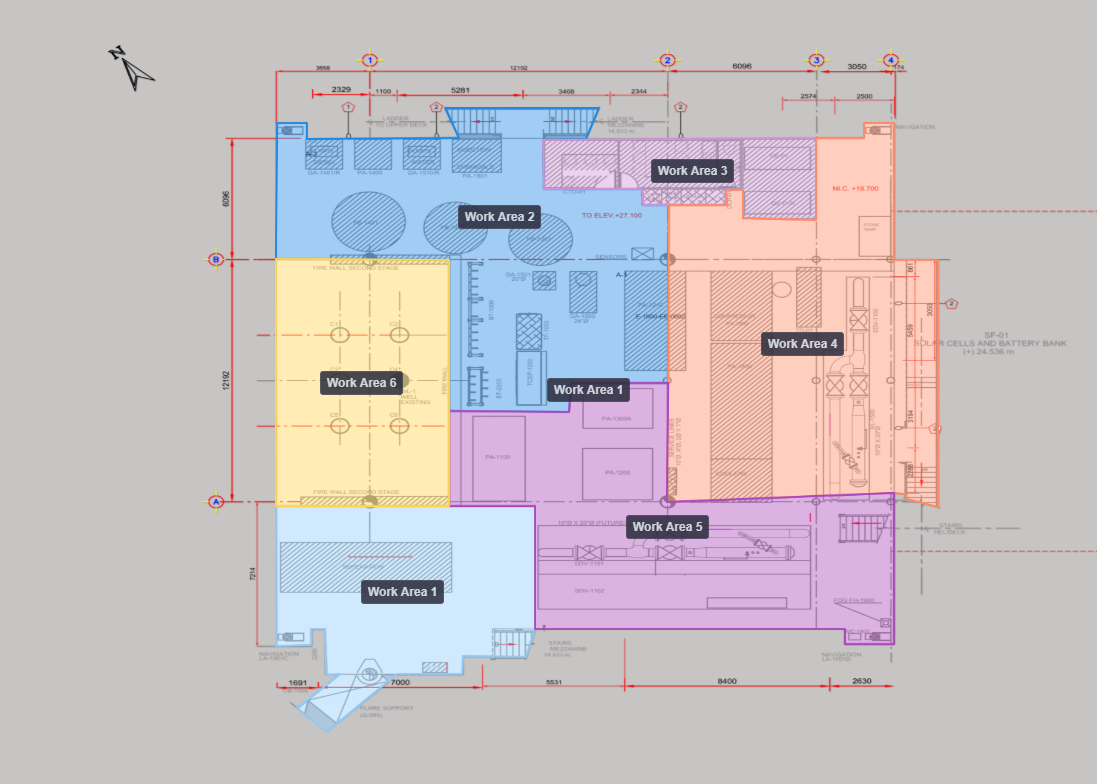
Work areas so sweeps actually finish

Between surveys, named areas keep the programme honest. Set how often each bay should be walked and act when it slips overdue. Survey-day outcomes (pending, clear, PDOs found) are on the dropped object surveys page.

  • Draw the areas Colour-coded polygons that match how crews walk the plant.
  • Set the rhythm Monthly, 3-monthly or 6-monthly per area.
  • Act on overdue Overdue areas raise a banner on the map.
Work areas and search filtered to a selected zone
Visibility

A company-wide view without rebuilding the spreadsheet

Open, overdue and removed counts, severity mix and type trends sit on one dashboard. Use that view to decide where the next sweep goes before risk concentrates on a deck.

  • Status at a glance Open, overdue and verified-removal counts for the asset you are on.
  • Type trends Repeat classes of dropped object show up as a pattern, not a surprise in audit.
  • Sweep health Overdue removals and overdue work-area inspections in the same place.
PDO programme dashboard with status counts
Instead of workbooks

Traceability on the plan, not in a folder

Area Spreadsheets and manual tracking With RigScene PDO
Company overview Excel workbooks per asset — copy-paste errors, missing fields, and no single view across the company All assets on one dashboard, with each site on the live plan for day-to-day decisions
Traceability Photos and notes in folders and inboxes — not linked to the PDO Timestamped audit trails, long-term monitoring, PDF reports and CSV export from the record
Risk insight No pattern view — teams react after issues grow or audits flag gaps Trending highlights concern on the plan so you prioritise sweeps before they escalate

PDO management questions

  • How does the built-in severity calculator work?

    Enter mass and drop height in kg/m or lb/ft. The calculator returns Slight, Minor, Major or Fatality, plus impact speed. Risk assessments on the PDO can be customised to how your organisation grades dropped objects.

  • Can I create custom PDO types?

    Yes. Manage types for the asset so the register matches your DROPS taxonomy. Each PDO can carry one or more types, and the dashboard trends counts by type.

  • Does PDO management require 360 virtual tours?

    No. RigScene PDO runs on maps, evidence and reports. Link a 360 tag only when RigScene 360 is also enabled.

Keep the register live between surveys.

See severity, exclusion zones and overdue sweeps on a sample asset. Virtual tours are optional.

Request a walkthrough